Table of Contents
- What Makes High Quality Webcast Production Essential for Business
- Corporate Live Streaming Services: Technology and Delivery
- Webcast Production Equipment Checklist for Professional Results
- How to Engage Remote Audiences During Webcasts
- Cost of Professional Webcast Production and ROI
- Security, Recording, and Content Ownership in High Quality Webcast Production
- Hybrid Events and Scalability: Supporting Audiences Across Regions
- Conclusion
Last Updated: August 27, 2026
What Makes High Quality Webcast Production Essential for Business
High quality webcast production for business transforms how organisations communicate with dispersed audiences. A polished broadcast with crisp HD video, seamless transitions, and professional audio signals competence and respect for your audience. A poorly executed webcast with choppy video, audio dropouts, or technical failures damages your brand and wastes the opportunity entirely.
Remote and hybrid audiences have become permanent fixtures in business communication. Whether you’re reaching 50 people or 5,000, your webcast is often the first impression stakeholders, customers, or employees have of your organisation. A broadcast that works flawlessly across devices, regions, and internet conditions signals professionalism. One that stumbles signals the opposite. High quality webcast production for business isn’t a luxury, it’s a baseline expectation.
Corporate Live Streaming Services: Technology and Delivery
Corporate live streaming services handle the technical complexity so your team can focus on content and messaging. They manage broadcasting infrastructure, servers, bandwidth management, and content delivery networks that ensure your stream reaches viewers in HD without buffering or lag. They handle production: multi-camera setups, audio-visual design, lighting, and technical redundancy so if one component fails, the stream continues uninterrupted. They manage the audience experience through adaptive bitrate streaming, which automatically adjusts video quality based on each viewer’s connection speed.
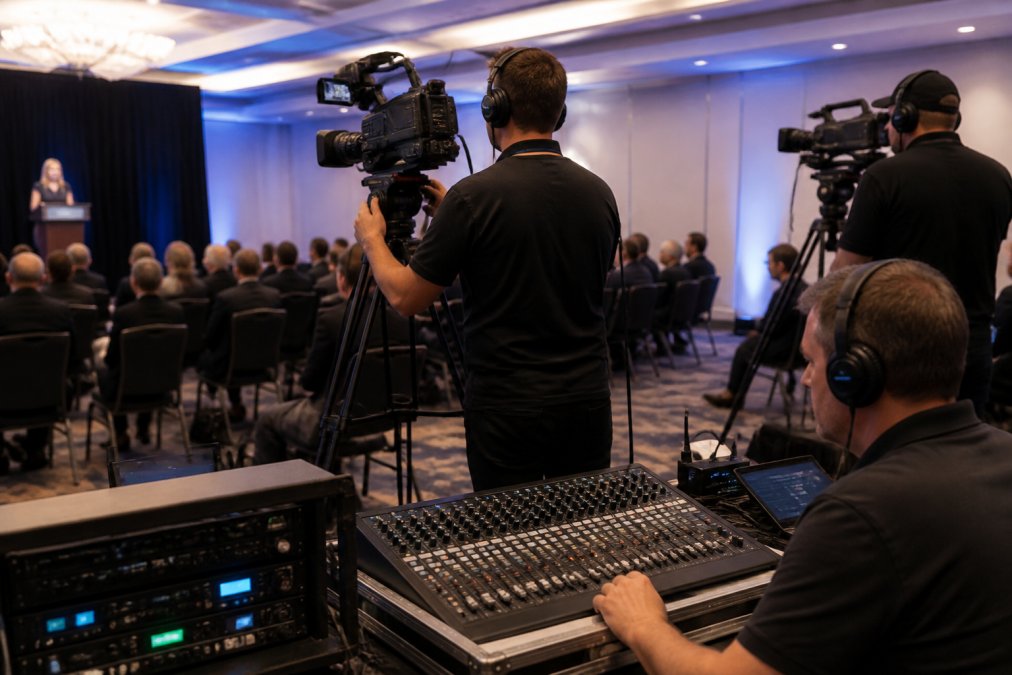
The "no drop-off guarantee" that services like Webcasting Livestream offer reflects redundant connections, backup systems, and failsafe procedures baked into every broadcast. If your primary internet connection fails, a secondary connection takes over automatically. If a camera malfunctions, the production team switches to another angle without interruption.
Content ownership is critical. Professional services like Webcasting Livestream ensure all video recordings belong to you. You own the files, can download them, and can reuse them for training, marketing, or archival purposes without additional fees. This transforms your webcast from a one-time event into a lasting asset.
Webcast Production Equipment Checklist for Professional Results
Delivering broadcast-quality output requires specific equipment working in concert.
Multi-camera setup and broadcast quality standards
A single static camera produces a flat, disengaging viewing experience. Professional webcast production uses multiple camera angles to maintain viewer interest and convey energy: a wide shot of the stage, a close-up camera for detail work, and sometimes a third camera for audience reactions or Q&A segments.
Each camera feeds into a production switcher, which selects which camera output goes to the broadcast stream. The operator switches between angles in real time, creating a dynamic broadcast that feels more like television than a static recording.
Broadcast quality standards dictate resolution, frame rate, and bitrate. HD (1080p) at 30 frames per second is the minimum for professional output. The key is consistency: your stream should look equally sharp on a desktop monitor, mobile phone, and tablet. Adaptive bitrate streaming achieves this by automatically adjusting video quality based on each viewer’s connection speed.
Audio-visual design and streaming infrastructure
Audio quality often determines whether viewers stay engaged or mute your stream. Poor audio drives people away faster than video issues. Professional setups use multiple microphones: a lapel or headset mic for the presenter, a podium mic for Q&A, and ambient mics to capture room acoustics without overwhelming the speaker’s voice.
An audio mixer combines these inputs and adjusts levels in real time, ensuring a clean feed to the broadcast. Streaming infrastructure refers to the backend systems that encode your video, manage bandwidth, and distribute it to viewers. A content delivery network (CDN) ensures viewers around the country receive a smooth stream without buffering or quality drops.
How to Engage Remote Audiences During Webcasts
Broadcasting to a screen requires active engagement strategies. Remote audiences are more likely to multitask or tune out if not actively involved.

Live polls and surveys create moments of interaction. Viewers answer questions, see results instantly, and feel part of a shared experience. Interactive Q&A sessions let viewers submit questions in real time, creating spontaneous dialogue that feels authentic. Chat functionality allows viewers to discuss content and connect with one another.
Real-time analytics show how many people are watching and where they’re dropping off. If viewers leave during a particular section, you know that content isn’t resonating. Post-event engagement extends the conversation: sending viewers the recording, a summary, and a survey asking for feedback often generates higher engagement than the live event itself.
Cost of Professional Webcast Production and ROI
Professional webcast production involves real costs: equipment, technical staff, streaming infrastructure, and post-production work. Pricing depends on event scale, production complexity, duration, and whether you need post-production editing. Request a quote from a service provider based on your specific event for transparent pricing.
ROI calculations justify the investment. A webcast reaching 1,000 people instead of 100 multiplies your audience impact. A recorded webcast reused for training, onboarding, or marketing extends value far beyond the live event. Lead generation through webcast registration and engagement data provides sales teams with qualified prospects. Many organisations recoup webcast costs within a single event through improved sales outcomes, reduced travel expenses, or expanded reach.
Security, Recording, and Content Ownership in High Quality Webcast Production
Sensitive corporate communications require security measures that prevent unauthorised access or recording. Professional webcast production incorporates encryption, access controls, and authentication so only intended audiences see your content.
Encryption protects data in transit from your venue to viewers’ devices. Access controls restrict who can view the stream through login credentials, email domain restrictions, or time-limited access windows. Digital rights management (DRM) technologies make unauthorised copying significantly harder, particularly important for confidential internal communications or proprietary product information.
All video should be recorded as standard practice. The recordings belong to you. Post-event video editing adds polish: a 90-minute webcast might be trimmed to highlight key moments, motion graphics added, and segments repurposed into shorter clips for social media or email campaigns.
Hybrid Events and Scalability: Supporting Audiences Across Regions
Hybrid events blend in-person and remote attendance, requiring webcast production to support both simultaneously. Multiple cameras positioned strategically show the stage, audience reactions, and demonstrations. Audio from the venue is captured and balanced so remote viewers hear speakers clearly. Remote viewers see graphics, slides, and camera angles that enhance their experience.
Interactive elements bridge the gap: when an in-person audience member asks a question, a moderator repeats it for remote viewers. Remote participants submit questions via chat, which are then asked on stage. This creates shared participation rather than two separate experiences.
Scalability refers to the system’s ability to handle growing audience numbers. Professional streaming infrastructure automatically activates additional servers as viewer count increases, ensuring stability even with unpredictable attendance. Regional internet quality varies significantly; adaptive bitrate streaming and content delivery networks ensure viewers in regional locations experience smooth playback rather than constant buffering.
Conclusion
High quality webcast production for business has become essential infrastructure for modern organisations. Professional services handle the complexity, multi-camera production, broadcast-quality streaming, security, recording, and post-production, so your team can focus on content and messaging. Webcasting Livestream delivers end-to-end solutions with a no-drop-off guarantee, HD quality across all devices, secure infrastructure, and full content ownership. Your recordings are yours, delivered at no extra cost, and ready to repurpose for future communications.
Get a quote from Webcasting Livestream today and see how professional webcast production transforms your next event.
| Element | Importance | Impact |
|---|---|---|
| Multi-camera setup | Critical | Maintains viewer engagement through dynamic angles |
| HD streaming quality | Critical | Ensures professional appearance across all devices |
| Audio-visual design | High | Shapes audience perception and message retention |
| Interactive engagement tools | High | Increases participation and data collection |
| Failsafe procedures | Critical | Guarantees stream reliability during high-stakes events |
| Content ownership | High | Ensures recordings remain your asset indefinitely |
| Regional scalability | High | Supports distributed audiences across varying internet quality |
Regional audiences often experience buffering with standard streaming setups. Adaptive bitrate technology automatically adjusts video quality based on each viewer’s connection speed, so someone on a slower connection gets a smooth 720p stream instead of constant freezing at 1080p.
The real difference between amateur and professional webcast production for business isn’t the camera equipment, it’s the infrastructure, redundancy, and technical expertise that ensure nothing goes wrong when it matters most.
Attempting to stream a major corporate event with consumer-grade equipment and internet connection is a common mistake. When the stream fails during your product launch or AGM, you’ve damaged credibility with exactly the audience that matters most. The cost of a professional service is trivial compared to the cost of failure.
EXTERNAL SOURCES:
According to WCAG 2.1 accessibility guidelines, video content should include captions and audio descriptions to ensure remote audiences with hearing or vision impairments can access your webcast.
Research from Gartner’s 2026 Digital Events Report shows that organisations using professional streaming services report 34% higher engagement rates compared to DIY setups, primarily due to improved technical reliability and interactive features.
The Australian Consumer Law requires that service providers accurately represent their capabilities and deliver the services promised, making transparent service agreements and documented failsafe procedures essential for professional webcast production providers.
Frequently Asked Questions
What equipment do I need for professional high quality webcast production?
Professional webcast production requires multi-camera setups, high-definition video capture, professional audio equipment (microphones, mixers), lighting rigs, and robust streaming infrastructure with bandwidth management. A production equipment checklist should include broadcast-quality cameras, backup power supplies for technical redundancy, and video editing software for post-production. Most businesses benefit from hiring a professional production crew rather than managing equipment in-house, as they bring expertise in audio-visual design and live streaming technology that ensures broadcast quality across all devices.
How can I engage remote audiences during a webcast and measure success?
Engagement during webcasts improves through interactive Q&A sessions, live polls, motion graphics overlays, and real-time audience analytics. Measure success using real-time analytics dashboards that track viewer count, watch time, engagement rates, and content distribution metrics. Lead generation through video can be tracked by monitoring click-through rates on calls-to-action. Post-event analysis should include audience retention data and ROI measurement tied to business objectives such as brand trust, product awareness, or direct conversions.
Do I own the recordings from my webcast, and what about security?
Content ownership is critical, ensure your webcasting provider delivers all recordings to you at no extra cost and confirms you retain full rights. Security and data privacy compliance should include encrypted transmission, access controls for sensitive internal communications, and compliance with relevant data protection standards. Ask your provider about their technical redundancy measures, fail-safe procedures, and whether streams are accessible only to authorised viewers. Professional webcasting services should provide end-to-end security without hidden fees for recording downloads or reuse.
Will professional webcast production work reliably in regional areas with variable internet quality?
Reliable webcast production across regions depends on bandwidth management, streaming infrastructure designed for variable network conditions, and technical redundancy built into the system. Professional services should guarantee no drop-off during your event regardless of location. Confirm that your provider has tested delivery in your specific region, offers backup connectivity options, and can handle the expected concurrent viewer count. Scalability matters, ask whether your platform can support your audience size without performance degradation, particularly if you're expecting thousands of concurrent viewers.
This article was written using GrandRanker