Table of Contents
- Why Secure AGM Live Streaming Matters
- Plan and Prepare Your AGM Livestream
- Set Up AGM Livestream Access Control
- Configure Virtual AGM Voting and Q&A
- Execute Corporate AGM Livestream Setup
- Implement Secure AGM Live Streaming Controls
- Manage Hybrid and Remote Attendance
- Post-Event: Recording, Compliance, and Handover
- Frequently Asked Questions
Last Updated: October 10, 2026
Why Secure AGM Live Streaming Matters
When you stream corporate AGM securely, you protect sensitive discussions, shareholder data, and voting integrity. A failed stream damages trust, a breached stream exposes confidential information, and poor attendance tracking creates compliance issues.
Security is a governance requirement. Shareholders expect their data protected, regulators expect audit trails, and your board expects flawless execution. This guide covers how to stream corporate AGM securely from start to finish: access control, voting systems, technical setup, and incident recovery.
Plan and Prepare Your AGM Livestream
Define your audience and attendance expectations
Map who needs access: in-person shareholders, remote shareholders, board observers, moderators, and media (if applicable). Each group has different access levels and security requirements.
Estimate concurrent viewers, this drives your platform choice and infrastructure decisions. Regional connectivity matters: shareholders in remote areas may have slower internet, so your stream must adapt to varying bandwidth.
Create a technical rehearsal schedule
Schedule a full rehearsal at least one week before the event. Run through camera angles, audio levels, lighting, voting, Q&A moderation, speaker transitions, and incident recovery.
Invite IT staff, camera operators, moderators, speakers, and a test shareholder. Have them log in as if it’s the real event to catch problems early.
Create a runbook: a step-by-step checklist with exact timings, system startup sequences, and contact numbers for every role.
Set Up AGM Livestream Access Control
Registration and participant authentication
Require all remote attendees to register before the event with name, shareholder ID, and email. This creates an audit trail and prevents unauthorised access.
Use a registration form that integrates with your streaming platform. Registrants receive a unique access link that works only for that person, on the scheduled date, during the event window.
Cross-reference registered attendees against your shareholder register before granting access. This protects voting integrity and ensures only legitimate shareholders participate.
Password protection and shareholder verification
Require attendees to enter a password shown on shareholder notification emails. This prevents unauthorised sharing of access links.
Change the password 24 hours before the event to ensure only recent email checkers can access the stream.
For high-security AGMs, use multi-factor authentication: attendees enter shareholder ID, receive a one-time code via SMS or email, then enter that code to access the stream.
Encryption and secure content delivery
Encrypt your stream end-to-end so data is scrambled from studio to viewer. Intercepted connections show gibberish, not your AGM.
Use HTTPS for registration and login portals, and TLS encryption for the video stream. Verify these are enabled on your platform.
Avoid public platforms like YouTube or Facebook for sensitive AGMs. Use a private streaming service that deletes recordings after a set period and never stores shareholder data publicly.
Configure Virtual AGM Voting and Q&A
Enable secure electronic voting
Electronic voting systems must be tamper-proof: one vote per shareholder per resolution, real-time tallying, and simultaneous result display.
Test voting during rehearsal with a dummy resolution. Verify votes are recorded correctly, tallies match vote counts, and results display without delay.
Use a voting platform separate from your livestream for redundancy. Integrate them so results appear on screen automatically, but keep them independent.
Manage live Q&A and moderation
Live Q&A requires careful moderation. Questions come via text so moderators can review them before they’re read aloud, preventing off-topic rants, abuse, or solicitation.
Assign a dedicated moderator to screen questions in real time and approve only relevant, respectful questions directed at the board.
Set clear rules in your shareholder notice and display them on screen before Q&A begins.
Execute Corporate AGM Livestream Setup
Camera, audio, and lighting configuration
Use at least two cameras: one wide shot of the room and board table, one close-up of the speaker. Switch between them to maintain viewer interest.
Position cameras at eye level or slightly above, where they don’t block shareholder sightlines.
Use a lapel microphone for the chair and handheld for Q&A speakers, plugged into a mixing desk. Test audio levels 30 minutes before the event to confirm clarity and consistent volume.
Use bright, even lighting. Avoid harsh shadows. Three-point lighting (key, fill, back) is ideal. Avoid mixing daylight with artificial light.
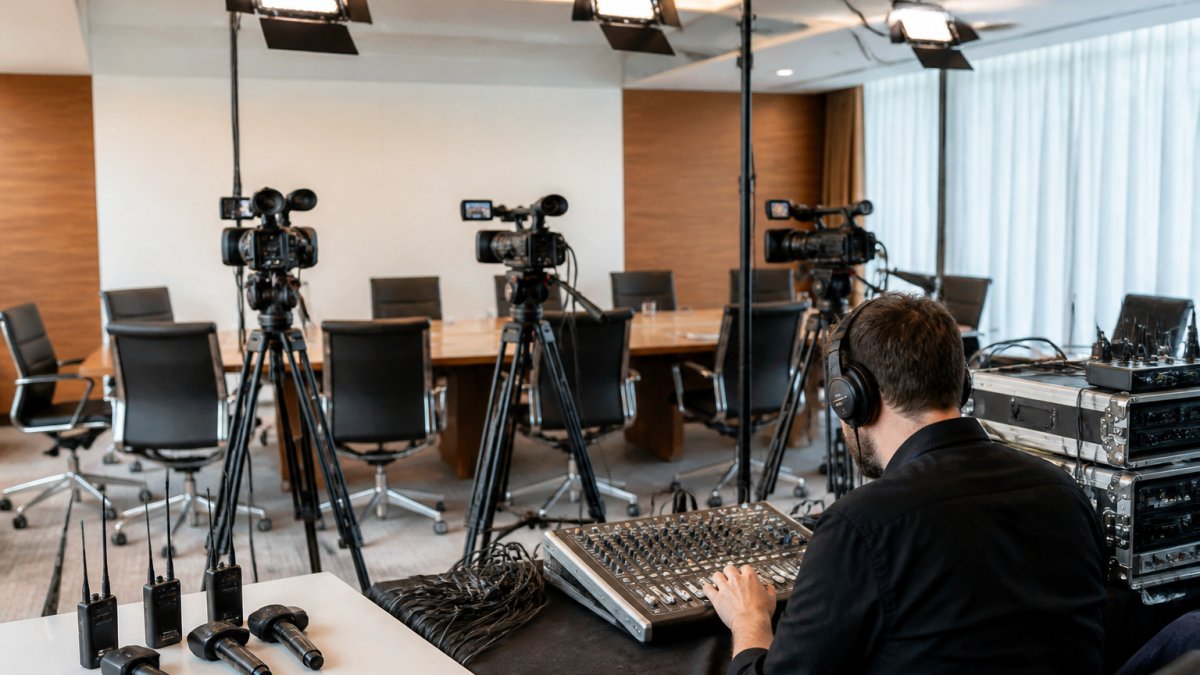
Multi-camera coverage for professional broadcast quality
Switch between cameras smoothly using fades or dissolves, not abrupt jumps. This keeps viewers engaged and makes the broadcast feel polished.
Use a vision mixer operated by a dedicated person. Follow a simple plan: wide shot during discussion, close-up when someone speaks, back to wide shot for transitions.
A third camera angle (side shot of shareholders) shows audience engagement and breaks monotony.
Test all camera angles during rehearsal and confirm the vision mixer operator understands the shot sequence.
Test all systems before go-live
Run a full end-to-end test 24 hours before the event: log in as a remote shareholder, test voting, ask a Q&A question, and confirm everything works.
Test on desktop, laptop, tablet, and mobile. Confirm smooth playback and readable buttons and text on small screens.
Test on both broadband and mobile data to confirm the stream adapts to slower connections without dropping out.
Test backup systems: if primary internet fails, does backup activate automatically? Time it, it should be instant or near-instant.
Document test results. If something fails, fix and retest. Verify it works.
Implement Secure AGM Live Streaming Controls
Redundant systems and backup connectivity
Use a fast, stable business-class connection with sufficient bandwidth for your stream bitrate plus overhead. If streaming at 5 Mbps, order at least 20 Mbps available.
Your backup connection should be completely separate (different provider, different technology). When primary fails, backup activates automatically with no visible gap.
Use a failover device that monitors both connections and switches between them automatically.
Test failover before the event: unplug primary, confirm stream continues on backup, reconnect primary, confirm resumption.
Have a mobile hotspot as a third-tier backup to keep a low-bitrate feed alive if both primary and backup fail.
Incident response and recovery procedures
Create an incident response plan covering stream failure, audio drops, voting failure, and compromised shareholder connections.
Assign roles: technical lead (diagnoses), communications lead (updates shareholders), decision-maker (pause/continue/restart).
Document responses: stream fails (switch to backup, resume in 60 seconds, notify shareholders); audio drops (check batteries, swap microphone); voting fails (pause, diagnose, restart, extend window); compromised connection (revoke access, require re-authentication).
Practice these responses during rehearsal. Simulate each failure. Time how long recovery takes. Adjust procedures to minimise downtime.
Data protection and recording governance
Decide upfront: who owns the recording? Who can access it? How long is it kept? Where is it stored?
Most AGM recordings are kept for seven years to satisfy governance requirements. Store them on a secure server, not on public cloud storage. Encrypt them at rest and in transit.
Limit access to the recording. Board members, company secretary, auditors, yes. General staff, no. Shareholders, only if your constitution allows it. Document who accessed the recording and when.
If a shareholder requests a copy for personal records, you can provide it. But don’t publish it publicly or share it with competitors.
Establish a data retention schedule. After seven years, delete the recording permanently. Don’t keep it “just in case.” Deleting old recordings reduces liability and respects shareholder privacy.
Manage Hybrid and Remote Attendance
Accessibility for all participants
Not every shareholder can attend in person. Some are interstate. Some have mobility challenges. Some prefer remote access. Your livestream should accommodate all of them equally.
Provide live captions for the entire broadcast. This helps shareholders who are deaf or hard of hearing. It also helps people in noisy environments or with poor audio quality.
Offer an audio-only option for people with slow internet connections. They can dial into a conference bridge and listen to the AGM without video.
Make sure your registration and voting systems are accessible. Use large fonts, high contrast, and clear language. Test with screen readers (software that reads text aloud for blind users).
Provide technical support. Have a phone number shareholders can call if they can’t access the stream.
Supporting regional connectivity
Shareholders in regional areas often have slower internet. Your stream should adapt gracefully. Use adaptive bitrate streaming: the platform automatically reduces video quality if bandwidth drops, so the stream doesn’t buffer or stall.
Test your stream on slower connections before the event. If you have a 5 Mbps connection at the office, test on a 2 Mbps mobile hotspot. Confirm the stream plays without constant buffering.
Provide a low-bandwidth option: a stream at lower resolution (720p instead of 1080p) or lower frame rate (24 fps instead of 60 fps). Shareholders with slow connections can choose this option and avoid buffering.
Have a phone dial-in option. Shareholders can listen to the AGM via a conference bridge without using internet at all. This is essential for people in areas with unreliable broadband.
Post-Event: Recording, Compliance, and Handover
Secure recording delivery and storage
Your recording should be available immediately after the event ends. Shareholders may want to review discussions or voting results. But don’t make it public.
Store the recording on a secure server with access controls. Shareholders log in with their credentials to watch. Board members and auditors have permanent access. Other staff have no access.
Encrypt the recording file itself. Use AES-256 encryption so that even if someone steals the file, they can’t watch it without the decryption key.
Provide the recording in a format that’s easy to share internally but hard to share externally. A password-protected link works well: it’s simple for authorised people to use, but useless if forwarded to someone outside the organisation.
Compliance documentation and retention
Document everything about the livestream for your governance file. Include:
- Number of shareholders who attended in person
- Number who joined remotely
- Total attendance
- Voting results for each resolution
- Questions asked during Q&A
- Any technical issues and how they were resolved
- List of people who accessed the recording
This documentation proves the AGM was properly conducted. It satisfies auditors. It protects the company if a shareholder later challenges a resolution.
Keep the documentation for seven years. After that, you can destroy it. But don’t destroy it early. Auditors may request it years later.
If a shareholder requests a copy of the recording for personal records, provide it. Document that you provided it: date, shareholder name, reason.
Streaming a corporate AGM securely requires planning, technical skill, and rigorous testing. The livestream itself is only one part of the puzzle.
Webcasting Livestream handles all of this for you. Our no-drop-off guarantee means your stream stays live, and your content belongs to you forever.
Get a quote from Webcasting Livestream today and see how we make secure AGM livestreaming simple.
Frequently Asked Questions
How do you restrict access to an AGM livestream?
Restrict access through participant registration, password protection, and shareholder authentication. Require attendees to log in with credentials verified against your shareholder register before they can join the stream. Use end-to-end encryption to secure the connection. Your streaming platform should support role-based access so only authorized attendees can view sensitive content. Multi-factor authentication adds an extra layer of security for high-stakes meetings.
What equipment is needed to stream a corporate AGM securely?
You need at least two cameras for multi-camera coverage, professional-grade microphones (lapel and room mics), LED lighting to ensure visibility, a backup internet connection (mobile hotspot or secondary broadband), a video mixer or streaming encoder, and a reliable streaming platform with encryption. Redundant systems prevent single points of failure during your broadcast.
Can you hold a corporate AGM online securely?
Yes. Modern streaming platforms support secure virtual AGMs with password protection, participant authentication, electronic voting, and live Q&A. Encrypt all data in transit and at rest. Record the meeting for compliance records. Ensure your platform provider has clear data protection policies and vendor responsibilities defined in writing.
How do you protect voting and shareholder information during an online AGM?
Use secure electronic voting systems that authenticate each shareholder before allowing them to cast a vote. Voting data should be encrypted both during transmission and storage. Separate voting records from personal data where possible. Ensure your streaming platform complies with privacy legislation and data retention rules. Conduct security testing before the event. Have an incident response plan in case of breach or technical failure. Provide shareholders with confirmation of their vote cast.