Table of Contents
- Streaming Guys vs AV Partners: Service Overview and Key Differences
- Event Streaming Equipment and Support: What Each Provider Delivers
- Corporate Live Streaming Services: Reliability and Uptime Guarantees
- Recording, Ownership, and Content Rights
- Questions to Ask a Live Streaming Provider Before You Commit
- Pricing, Quotes, and What Affects Your Cost
- Which Provider Should You Choose?
- Frequently Asked Questions
Last Updated: October 4, 2026
Streaming Guys vs AV Partners: Service Overview and Key Differences
When you’re planning a corporate event, product launch, or conference, choosing the right live streaming provider can mean the difference between a flawless broadcast and a technical disaster. The comparison between streaming guys vs av partners reveals two distinct approaches to live streaming and audio-visual delivery in the event production space.
Streaming Guys specialises in digital streaming and multi-platform distribution, while AV Partners roots itself in traditional audio-visual production, treating live streaming as one component of broader event management. This foundational difference shapes equipment choices, on-site support models, and contingency planning.
Event Streaming Equipment and Support: What Each Provider Delivers
Streaming Guys: typical equipment and crew composition
Streaming Guys’ standard package for corporate events typically includes:
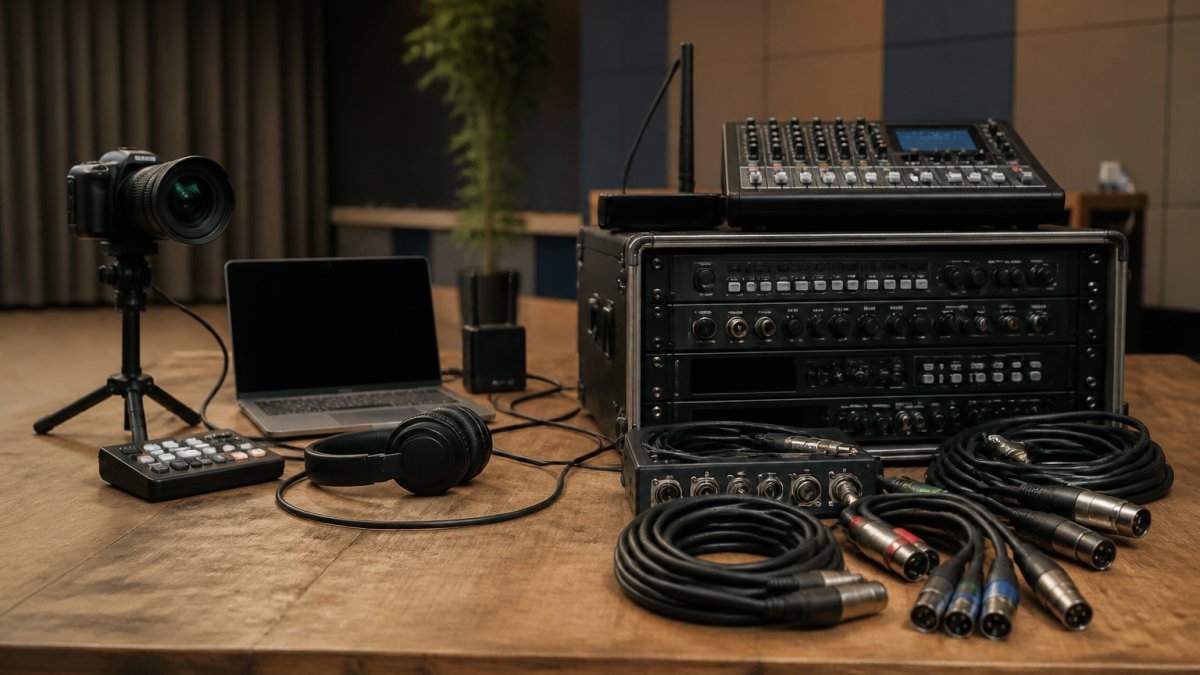
Video capture: One to three professional cameras (Sony or Panasonic broadcast-grade) with remote pan-tilt-zoom capability. Smaller events use a single fixed camera; larger conferences include a roaming camera for audience interaction.
Audio: Wireless microphone systems (Sennheiser or Shure), a compact mixing console, and integration with your venue’s existing sound system, reducing on-site equipment footprint.
Internet connectivity: Backup mobile hotspot devices (4G/5G) as failover. For events expecting over 2,000 concurrent viewers, they may request a dedicated internet line.
Crew: Typically two to three technicians on-site, a lead streaming engineer, camera operator, and technical support person.
Recording: Streams captured to cloud storage and provided within 24-48 hours as downloadable files.
AV Partners: typical equipment and crew composition
AV Partners’ standard package reflects a full-production mindset:
Video capture: Three to five professional cinema or broadcast cameras, each with dedicated operators, ensuring multi-angle coverage if one camera fails.
Audio: Professional mixing console, wireless microphone systems with backup handhelds, and dedicated audio technician.
Lighting: Included in most packages.
Switching and vision mixing: Dedicated vision mixer operating a production switcher to cut between cameras, add graphics, and manage transitions in real time.
Internet and redundancy: Dual internet connections with automatic failover. Portable generator available for mission-critical events with unreliable venue power.
Crew: Typically five to eight people on-site, production manager, vision mixer, camera operators, audio technician, and technical support.
Recording: Multi-camera recording to redundant storage. Raw footage provided alongside edited stream for post-production flexibility.
Practical comparison: what you actually get
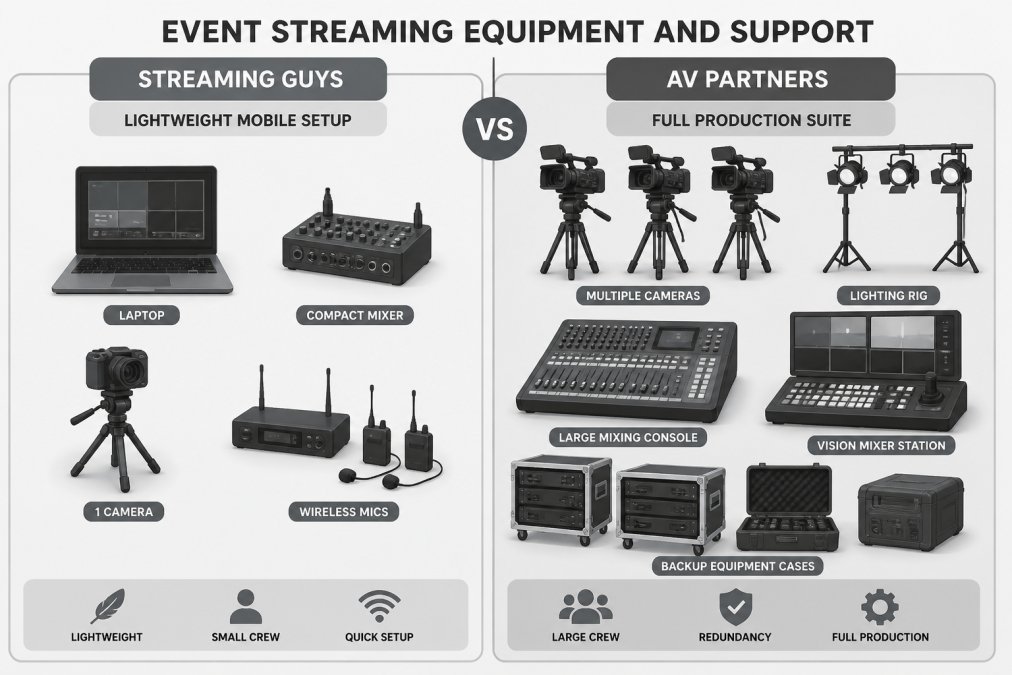
For a 200-person corporate conference with 3,000 online viewers:
- Streaming Guys arrives with two cameras, compact audio setup, and two technicians. Setup takes 2-3 hours. Cost is lower; your venue’s existing AV infrastructure must be functional.
- AV Partners arrives with four cameras, full mixing console, lighting rig, and five technicians. Setup takes 4-6 hours but includes complete environmental control with backup systems.
For a 50-person internal training webinar with 200 online viewers:
- Streaming Guys sends one technician with a single camera and audio kit. Setup is 30 minutes. Cost is minimal.
- AV Partners would be overkill; they have minimum crew and equipment requirements unsuitable for small events.
On-site support and contingency planning
Streaming Guys provides remote technical support with on-site staff for larger events. Their model assumes technical competence from your internal team. For events with fewer than 500 concurrent viewers or internal-only distribution, this works well.
AV Partners assigns a dedicated crew handling setup, equipment management, troubleshooting, and real-time adjustments. The trade-off is cost and coordination complexity, but your internal staff focus entirely on event content and attendee experience rather than monitoring technical systems.
If your IT team is stretched or your coordinator manages multiple logistics, AV Partners’ full-service model removes technical burden.
Corporate Live Streaming Services: Reliability and Uptime Guarantees
Streaming Guys emphasises platform uptime; AV Partners emphasises end-to-end reliability with physical equipment redundancy, backup power, and contingency protocols. For mission-critical events, physical redundancy can be the difference between success and reputational incident. For internal training or regular webinars, platform-level reliability often suffices.
Webcasting Livestream offers a no-drop-off guarantee across our streaming infrastructure, with fail-safe procedures designed specifically to ensure streams do not fail during critical corporate communications. Our team manages both the technical delivery and contingency protocols to protect your event.
Recording, Ownership, and Content Rights
Clarify ownership and usage rights upfront. Some providers retain rights to your content for marketing purposes, creating problems with sensitive internal communications or proprietary information. AV Partners generally treats recordings as your property with no usage restrictions, which matters when repurposing content for training, compliance, or internal distribution.
With Webcasting Livestream, all recordings belong to you. We provide comprehensive recording services at no extra cost, and you retain full ownership. That means you can download, archive, and repurpose your content for training, compliance documentation, or internal communications without negotiating licensing terms.
Questions to Ask a Live Streaming Provider Before You Commit
Uptime guarantees and failure protocols
Ask for a specific uptime percentage and what happens when they miss it. A provider claiming 99.9% uptime is promising less than 9 minutes of downtime per month. Ask what that actually means for your event, do they compensate you if they fail? Do they credit future services?
More importantly, ask about their failure protocols. If the primary internet connection drops, what’s the backup? If the encoder fails, how long until a technician can swap it? If a camera malfunctions, do they have a spare on-site? These details separate providers who’ve genuinely thought through contingencies from those who’ve simply made promises.
Regional coverage and bandwidth reliability
If you’re hosting events across multiple states with varying internet infrastructure, ask about their regional experience. Some providers have optimised their systems for metro areas where fibre and high-speed internet are standard. Regional venues often have unpredictable bandwidth, and a provider experienced in managing that complexity will know which backup systems actually work in practice.
Ask specifically about their experience in your venue’s region. Have they streamed from similar locations? What bandwidth did they actually require? What happened when the primary connection underperformed?
Concurrent viewer capacity and scalability
Ask how many simultaneous viewers their system can handle without degradation. If you’re expecting 5,000 concurrent viewers, you need a provider whose infrastructure actually supports that load. Some providers scale gracefully; others experience quality drops or outright failures once they exceed a certain threshold.
Ask for specific numbers: at what viewer count does quality degrade? At what point does the system fail? What’s their maximum capacity? If they’re vague, that’s a signal they haven’t tested those limits.
Pricing, Quotes, and What Affects Your Cost
Neither provider publishes fixed pricing, typical for event production services. Understanding cost drivers helps you evaluate proposals fairly and avoid hidden expenses.
Streaming Guys: cost structure and quote factors
Streaming Guys’ pricing typically breaks into three components:
Base streaming fee: Covers platform setup, encoding infrastructure, and cloud storage. Multi-platform distribution (YouTube, Facebook, LinkedIn) may add 10-20% because it requires additional encoding resources.
On-site support: Charged separately as a day rate per technician. Multi-day events often receive per-day discounts.
Concurrent viewer scaling: Premium charged for more than 5,000 concurrent viewers. Underestimating peak count can result in quality degradation or mid-event upsells.
Venue-specific factors: Poor internet connectivity may incur extra charges for backup hotspots or require you to arrange a dedicated line. Unreliable power may incur fees for backup equipment.
Add-ons: Interactive features, custom branding, and post-production editing typically cost extra.
AV Partners: cost structure and quote factors
AV Partners’ pricing is driven primarily by crew size and equipment package:
Crew day rate: The largest cost component. A full production crew (five to eight people) costs significantly more than Streaming Guys’ two-person team but handles all technical aspects, eliminating need for additional vendors. Multi-day events receive per-day discounts.
Equipment package: AV Partners offers tiered packages:
- Standard: Three cameras, basic mixing console, wireless audio. Suitable for conferences where online attendance is primary.
- Professional: Four to five cameras, full mixing console, professional lighting, vision mixer, redundant internet. Suitable for hybrid events.
- Premium: All above plus additional cameras, advanced lighting, backup generators, redundant power, dedicated support. Suitable for mission-critical events.
Upgrading from Standard to Professional adds 30-50%; upgrading to Premium adds another 25-40%.
Event duration: Clarify whether your quote includes setup (4-6 hours) and breakdown (2-3 hours) or if those are additional charges.
Venue complexity: Extensive cable runs, complex audio integration, or custom lighting design may incur site survey fees and additional labour charges.
Concurrent viewer capacity: AV Partners doesn’t typically charge extra for viewer count. Extremely high viewership (50,000+) may require third-party CDN coordination, adding cost.
Recording and post-production: Multi-camera recording is included. Edited highlight reels, colour grading, and custom graphics cost extra.
Comparing quotes: what to ask for
When requesting quotes, be specific about requirements:
Event specifications: Date, time, duration (including setup/breakdown), in-room attendees, concurrent online viewers, number of days, venue location.
Technical requirements: Camera angles, platform distribution, audio sources, lighting, recording format and delivery timeline, interactive features.
Support and contingency: Crew size and roles, backup systems, technical support availability, equipment failure protocols.
Ownership and usage rights: Recording ownership, content repurposing rights, usage restrictions, retention period.
Itemised quotes vs. flat rates
Insist on itemised quotes breaking down crew, equipment, platform fees, and add-ons separately. A flat “$X for your event” quote obscures what you’re paying for and makes comparison difficult. An itemised quote shows exactly where your money goes and identifies cost-reduction opportunities without sacrificing quality.
Hidden costs and what to clarify
Common hidden costs include: travel and accommodation for regional venues, internet upgrades, backup equipment rental, post-production and editing, and extended support for rehearsals or walkthroughs. Clarify what’s included in the quote upfront.
The cheapest quote rarely delivers the best value
Compare what you’re actually getting for the price. Does the cheaper quote include backup systems? Is the crew experienced with your event type? What’s included in “recording”? Are there hidden costs not mentioned in the headline price?
Which Provider Should You Choose?
Streaming Guys suits organisations prioritising digital reach and multi-platform distribution with internal technical capacity.
Webcasting Livestream serves organisations needing reliability without compromise. Our no-drop-off guarantee, fail-safe procedures, and comprehensive recording services address technical failures, content ownership, and vendor management.
Match the provider’s capabilities to your actual needs. Ask hard questions about reliability, equipment redundancy, content ownership, and regional experience. Get itemised quotes.
Australian Communications and Media Authority guidance on digital broadcasting standards
Event Managers Association best practices for hybrid and virtual event production
Professional Audio Engineering Society standards for live event audio and video
Frequently Asked Questions
What is the main difference between Streaming Guys and AV Partners for corporate events?
Both providers offer live streaming and AV production services, but they differ in their technical infrastructure, support models, and service scope. Streaming Guys typically focuses on straightforward streaming delivery with equipment hire, while AV Partners often emphasises full event production including venue setup, staging, and integrated multimedia. When comparing the two, ask about their uptime guarantees, concurrent viewer capacity, and whether they provide dedicated on-site technicians for your event size and complexity.
What questions should I ask a live streaming provider before booking?
Ask about their no-drop-off or uptime guarantee and what happens if the stream fails during your event. Inquire about concurrent viewer capacity (how many simultaneous viewers they can handle), regional coverage in your area, HD quality delivery across all devices, content ownership and recording rights, security measures for sensitive communications, and whether they provide all technical support or require your IT team’s involvement. Request examples of events similar to yours and ask for references from past clients.
Do both providers include event recording and content ownership?
Recording policies vary between providers. Some include recordings at no extra cost; others charge separately. Content ownership is critical: confirm whether you own the recordings outright or if the provider retains any rights. This matters for reusing content in training, internal communications, or archived materials. Always request this in writing as part of your quote, and clarify whether downloads, editing rights, and long-term storage are included or incur additional fees.
Which provider is better for regional or remote events?
Reliability in regional areas depends on each provider’s bandwidth partnerships and technical infrastructure. Ask both providers about their experience streaming from your specific location and whether they’ve managed events with varying internet quality. Some providers offer mobile backup connectivity or can pre-position equipment to handle lower bandwidth. Get specific details on their contingency procedures if primary internet fails, and ask whether they’ve successfully streamed from similar regional venues before committing.