Table of Contents
- What Livestreams Are and Why They Matter for Business
- How Livestreams Work: Technical Foundations
- Live Streaming Best Practices for Professional Events
- Corporate Webcasting Services: What You Need to Know
- Event Recording and Archiving: Maximising Your Content
- Real-Time Audience Engagement During Your Livestream
- Security and Compliance for Professional Livestreams
- Conclusion
- Frequently Asked Questions
Last Updated: September 18, 2026
What Livestreams Are and Why They Matter for Business
Livestreams are real-time video broadcasts that create immediate connection between broadcasters and viewers. For businesses, livestreams enable corporate communications, product launches, training sessions, and large-scale events where geographic distance once prevented participation.
Livestreams eliminate geographic constraints, allowing employees, clients, and partners to participate from anywhere and transforming isolated events into inclusive experiences.
The difference between successful and failed livestreams comes down to technical preparation, audience engagement strategy, and understanding your event’s specific requirements.
How Livestreams Work: Technical Foundations
Livestreams rely on content sources (camera, screen capture, or mixing console) feeding into encoding software that compresses video for transmission. The encoded stream travels to a server, which distributes it to viewers’ devices in real-time.
Key technical elements include bitrate (video quality), frame rate (motion smoothness), and resolution (clarity). Bandwidth availability at your broadcast location dictates achievable quality.
Standard streaming introduces 10-30 seconds of latency, suitable for most events. Low-latency protocols reduce this to under 5 seconds for interactive experiences, though they require more sophisticated infrastructure.
Most professional livestreams use HLS distribution because it works reliably across phones, tablets, desktops, and smart TVs without requiring special software.
Diagnosing and Preventing Common Streaming Failures
Dropped frames indicate encoding or network stress. Monitor your encoder’s real-time statistics during broadcast; if dropped frames exceed 1-2 per minute, reduce bitrate or resolution immediately. Prevention is your only option, as dropped frames are irreversible once broadcast.
Audio-video sync issues create lip-sync mismatches when audio and video arrive at different speeds. Test sync during rehearsal by clapping in front of the camera and verifying sound matches visible movement. If sync drifts during broadcast, reduce bitrate to resolve the network problem.
Network bottlenecks cause most livestream failures. Your upload speed must exceed your target bitrate by at least 50 per cent (e.g., 8 Mbps for 5 Mbps streaming). Test from your actual broadcast location using Speedtest by Ookla immediately before your event. If upload speed is borderline, reduce bitrate or resolution rather than risk failure.
Latency spikes indicate network congestion. Reduce bitrate, close bandwidth-consuming applications, or move to stronger connectivity. For critical events, maintain a secondary internet connection that can take over if your primary connection degrades.
If CPU usage exceeds 80 per cent during broadcast, reduce resolution or frame rate. Hardware encoders are more reliable than software encoding for high-bitrate streams.
Live Streaming Best Practices for Professional Events
Test your entire setup at least 48 hours before the event: camera positioning, audio levels, internet connectivity, and backup systems. Most failures occur from lack of verification.
Bad audio drives viewers away immediately. Use external microphones and a mixing console for control over multiple sources. Monitor audio levels continuously during broadcast.
Real-time bandwidth monitoring prevents mid-stream failures. Your upload speed must comfortably exceed your target bitrate; test from your actual event location, as network conditions vary significantly across venues.
Backup systems aren’t optional for important events. Maintain a secondary internet connection (mobile hotspot, different ISP) and backup encoding hardware ready to take over if your primary connection fails.
Plan your on-screen layout before the event and test transitions during rehearsal. Sloppy transitions look unprofessional and distract from your message.
Corporate Webcasting Services: What You Need to Know
Corporate webcasting services handle the technical complexity so your team can focus on content delivery. A professional webcasting provider manages encoding, server infrastructure, distribution across devices, and monitoring throughout your event.
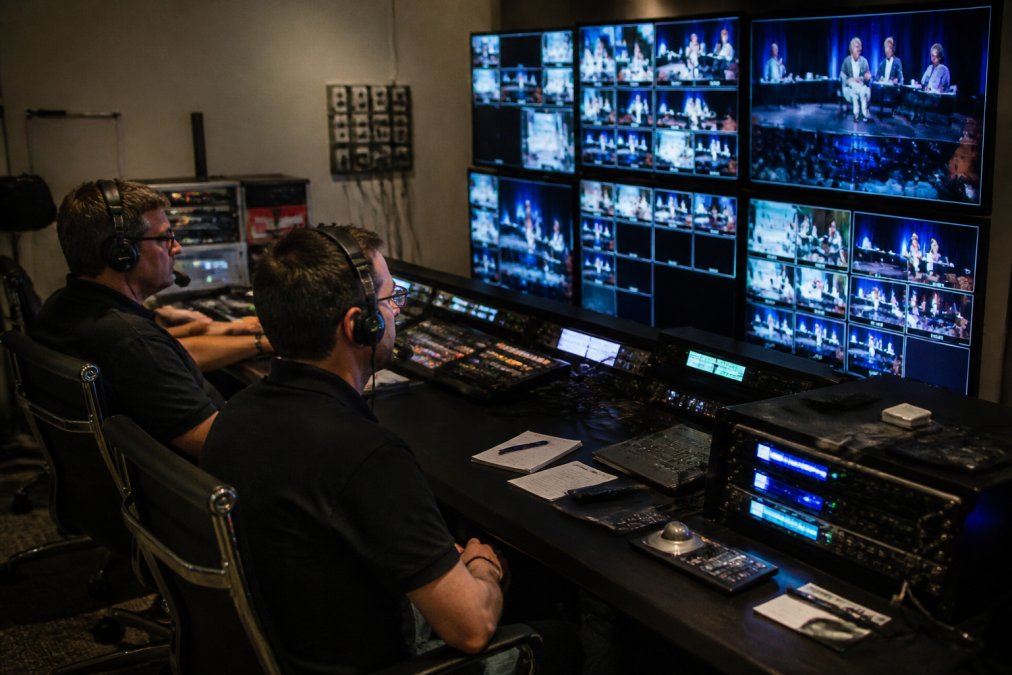
High-quality audio remains the cornerstone of any successful webcast, and mastering professional voiceover techniques ensures that your message resonates with clarity and authority across every digital channel.
When evaluating corporate webcasting services, assess their capacity for your expected audience size, infrastructure redundancy, and HD quality support across all devices.
For sensitive corporate communications, verify the service offers password protection, IP whitelisting, or authentication integration with your existing systems.
Verify you own all recordings and can download them without restrictions or ongoing fees. Some providers lock you into their platform or charge substantial fees to retrieve your own content.
Verify the service provides dedicated technical support throughout your broadcast, with real-time monitoring and ability to adjust encoding if network conditions change.
Event Recording and Archiving: Maximising Your Content
Recording your livestream transforms a one-time event into persistent content that employees can watch later and training sessions can become reusable learning resources.
Request recordings in formats suited to your use: MP4 for universal compatibility, broadcast-quality for editing, or web-optimised for embedding on websites or learning management systems.
Archive recordings with clear metadata (event name, date, speakers, topics) and implement a tagging system matching your organisation’s search habits. Without proper organisation, valuable recordings become lost.
Plan your archiving strategy based on content lifespan: training content may need annual updates, compliance recordings may require indefinite retention, and product videos may become outdated within months.
Real-Time Audience Engagement During Your Livestream
Interactive livestreams build community and gather feedback, transforming broadcasts into conversations.
Designate someone to monitor chat, flag important questions, and manage moderation. Brief recognition of chat participation increases engagement significantly.
Polls and surveys capture instant feedback and create interactive moments that break up lengthy presentations, making participation more engaging than passive listening.
Structure Q&A sessions by collecting chat questions throughout the presentation, then allocating dedicated time for answers at the end. This prevents interruptions while ensuring viewer questions are addressed.
Establish clear participation guidelines and assign moderators to manage chat and maintain a professional environment. For large audiences, professional moderation is essential.
Security and Compliance for Professional Livestreams
Livestreams involving sensitive information require security measures beyond basic password protection. Internal communications, financial discussions, and personnel matters need restricted access.
Use authentication integration with your corporate directory and IP restrictions to limit access to authorised viewers only.
Australian Privacy and Data Protection Requirements
The Privacy Act 1988 governs personal information during livestreams. If your livestream captures personal information (employee names, contact details, health or financial data), obtain consent before broadcasting, be transparent about data use, and implement reasonable security measures.
The Notifiable Data Breaches scheme requires notification within 30 days if a data breach exposes personal information (applies to organisations with $3 million+ turnover or Australian Government agencies). Document security measures and incident response procedures before broadcasting sensitive content.
Health information livestreams must comply with the Health Records Act 2001 (private sector) or Privacy Act 1988 (public sector). Restrict access to authorised personnel, use encryption, and maintain access logs. Consider engaging a privacy officer for telehealth or medical training livestreams.
Financial services livestreams must comply with ASIC guidance. Ensure investment advice and product information are not misleading and all claims are substantiated. Keep detailed records for compliance.
Copyright and Intellectual Property Protection
Verify you have appropriate licenses for third-party content (music, footage, materials). Some licenses permit recording and archiving; others restrict use to live broadcast only. Unauthorised use can result in takedown notices or legal action.
Music licensing requires a licence from the copyright holder or collecting society. In Australia, APRA AMCOS manages music licensing. Contact them before broadcasting music-heavy content to determine requirements and costs. Streaming without proper licensing can result in takedown mid-broadcast.
Verify software licenses permit public demonstration and recording when screensharing third-party applications.
Recording Retention and Regulatory Obligations
Recording retention policies must comply with industry regulations. Financial services recordings must typically be retained for 7 years under ASIC rules (Company record keeping). Aged care and government agencies have specific retention requirements.
Maintain metadata alongside training and compliance recordings (date, attendees, topics, certifications) to support regulatory audits and demonstrate due diligence.
Data Collection and Analytics Compliance
If capturing viewer analytics or registration data, ensure compliance with privacy legislation. Your privacy policy must explain what data you collect, how you’ll use it, and retention periods. Verify third-party analytics vendors comply with Australian privacy law and have appropriate data processing agreements.
Conclusion
Livestreams have fundamentally changed how organisations deliver critical communications, training, and events to distributed audiences. Structured preparation and professional support eliminate most risks. Webcasting Livestream manages the entire technical infrastructure, encoding, distribution, recording, and archiving, so your team can focus on content delivery. GET A QUOTE today and discover how professional livestreaming transforms your corporate communications.
Frequently Asked Questions
What does ‘livestream’ mean in a business context?
A livestream is a real-time broadcast of an event transmitted over the internet to viewers across multiple devices. For businesses, livestreams enable companies to host corporate meetings, product launches, training sessions, and conferences with remote participants. Unlike recorded video, livestreams happen in real-time, allowing audiences to experience events as they unfold and interact with presenters through live comments or polls. Professional livestreams use encoding technology to compress video and audio, transmitting them via streaming protocols like RTMP or HLS to reach viewers with minimal latency.
What equipment do I need for a professional livestream?
Professional livestreams typically require a camera or capture card, a microphone for clear audio fidelity, stable internet with sufficient bandwidth (upload speed is critical), and streaming software to encode and broadcast your content. For corporate events, a dedicated capture card ensures hardware acceleration and better video quality than webcam-only setups. You’ll also need a reliable connection to your streaming platform or service provider. Many organisations use professional webcasting services that handle the technical infrastructure, eliminating the need to manage encoding, bitrate adjustment, and server-side management internally.
How can I ensure my corporate livestream doesn’t fail during an important event?
Redundancy and professional management are essential. Fail-safe procedures include backup internet connections, multiple encoding pathways, and real-time monitoring by experienced technicians. Professional webcasting services employ dedicated infrastructure with no-drop-off guarantees, meaning they monitor bitrate, synchronisation, and viewer connections throughout your broadcast. Test your setup thoroughly before the event, including bandwidth checks and audience load testing. Working with a provider that guarantees uptime and has documented procedures for handling failures gives you confidence that your event will reach your audience without interruption.
Do I own the recordings of my livestreamed events?
Content ownership depends on your service provider’s terms. With professional webcasting services, recordings typically belong to you, they’re captured automatically at no extra cost and provided in formats you can download and reuse. This is crucial for organisations that want to archive training sessions, repurpose product launch footage, or share recordings with absent stakeholders. Always confirm ownership terms and archiving policies with your provider before your event, especially if you plan to use recordings for ongoing training, compliance documentation, or marketing purposes.